Source control management (or an interchangeable term "version control") has made a surge of collaborative work and software delivery increasingly rapid. It is now standard in software development to maintain a single source of truth for development teams, which allows multiple developers to work on the same codebase. Git, as a leader outclassing other SCM tools, is obligatory to be mastered for everyone involved in software development processes.
Source control management (SCM) refers to tools that help you keep track of your code with a complete history of changes.
Why SCM?
- How to share the work?
- How to keep track of changes and their authors?
History
- The concept started with engineering
Drawing and project offices evolved a robust system for dealing with engineering processes and thus were born the fledgling change control and release systems. - Modern implementation in software development since ~1980
- Git started in 2005
What do you manage?
- Code, or any text-based projects (like all the configurations needed for the project)
- Manage project versions
- Global project version (tags)
- Each modification is a «version»
- Change requests
SCM types
Centralized
- has a single central repository
- single point of failure
- requires a network to inspect a history
Examples: Tortoise SVN
Distributed
- local repository with full history
- independent work
Examples: Git, Mercurial SCM
Git: concepts
Learn git - https://git-scm.com/doc
- Git Project
- Each set of changes to files are commits
- Each commit has a parent commit (except for the first one)
- The current commit is the HEAD
- The git project is kept in a remote location - repository
- Retrieving changes from the repo is pulling
- Sending changes to the repo is pushing
- When choosing what to commit, files are staged
Git: branches
- Branches - independent set of commits
- So far all commits are on the master branch
- Branch can be an abstraction for a line of development
- master is the stable, tested version of the project
- develop is the place where features come together
- feature is the branch for a single feature
A branch can be temporary:
- To have a change request
- To develop an independent feature
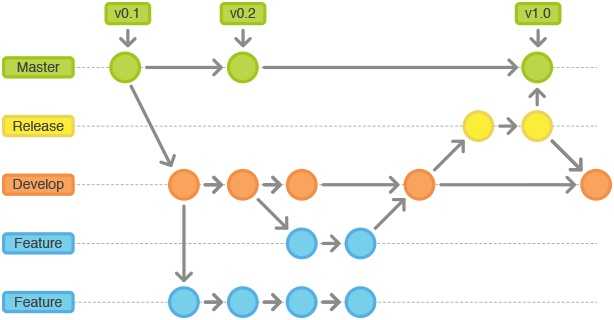
- Create branches or switch between them with
git branch
Git: tags
So far:
- changes are managed, not the project
- all the commits come one after the other
- the only version available in the commit id
Tagging versions:
- Tag a commit to be a particular software version
- It easier to identify the versions
- You have to push the tags
Git: merge & conflicts
- Branches can be merged to have all the changes in only one branch
- When multiple changes conflict with each other, the merge fails:
Automatic merge failed; fix conflicts and then commit the result. - Solutions:
- Cherrypick the changes (can be quite long)
- Abandon your changes (and put them back later)
- Work on the latest commit (git pull) and have a good task repartition
Git: merge vs rebase
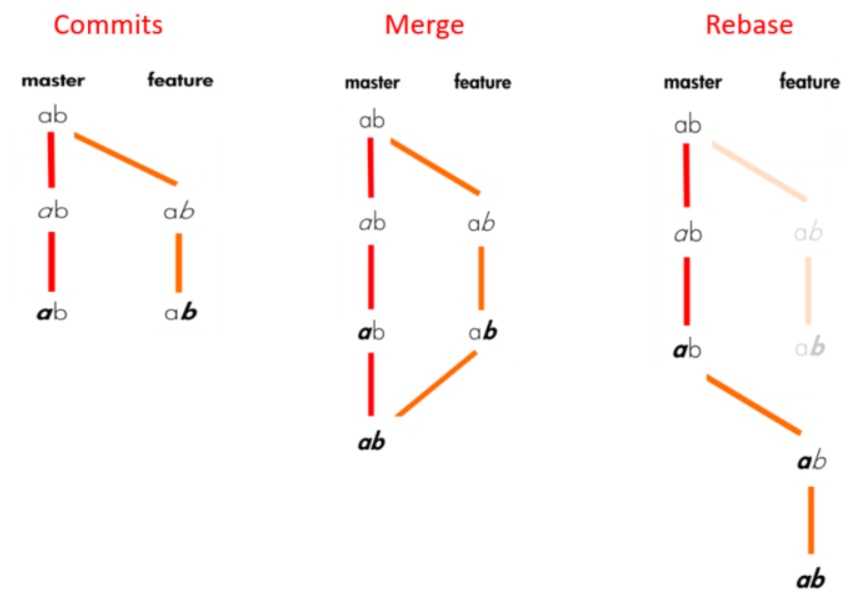
Read this article on Medium.
OpenSource Project Management
- Code managed by git, how can people contribute?
- Fork the project on your account
- Work on a change on your fork
- Ask for your changes to be added to the official code - pull request
Project management with GitLab
Provides from basic issue tracking to scrum and kanban style
- Track and manage issues
- Issue boards to visualize work
- Agile project management
- DevOps pipeline traceability
Read more about GitLab project management.
Git flow strategies
- Git Flow
- GitHub Flow
- GitLab Flow
- One Flow