The portability and reproducibility of a containerized process mean we have an opportunity to move and scale our containerized applications across clouds and data centers. Containers effectively guarantee that those applications run the same way anywhere, allowing us to quickly and easily take advantage of all these environments. Furthermore, as we scale our applications up, we’ll want some tools to help automate the maintenance of those applications, able to replace failed containers automatically and manage the rollout of updates and reconfigurations of those containers during their lifecycle. Tools to manage, scale, and maintain containerized applications are called orchestrators.
Requirements for Container-Based applications
- manage containers
- ensure that there is no downtime (SLA requirement)
Container orchestration tools provide
- deployment
- management
- scaling
- networking
Containers complexity
- Provisioning and deployment
- Configuration and scheduling
- Resource allocation
- Container availability
- Scaling or removing containers based on balancing workloads across your infrastructure
- Load balancing and traffic routing
- Monitoring container health
- Configuring applications based on the container in which they will run
- Keeping interactions between containers secure
Container orchestration tools
- Kubernetes
- Docker Compose (has limited functionality)
- Docker Swarm
- Apache Mesos
Kubernetes
Kubernetes - an open-source system for automating deployment, scaling, and management of containerized applications.
Provides:
- Automated rollouts and rollbacks
- Service health monitoring
- Automatic scaling of services
- Declarative management
- Deploy anywhere, including hybrid deployments
- Storage orchestration
Kubernetes cluster
Consists of:
- Master - coordinates the cluster
- Nodes - workers that run applications
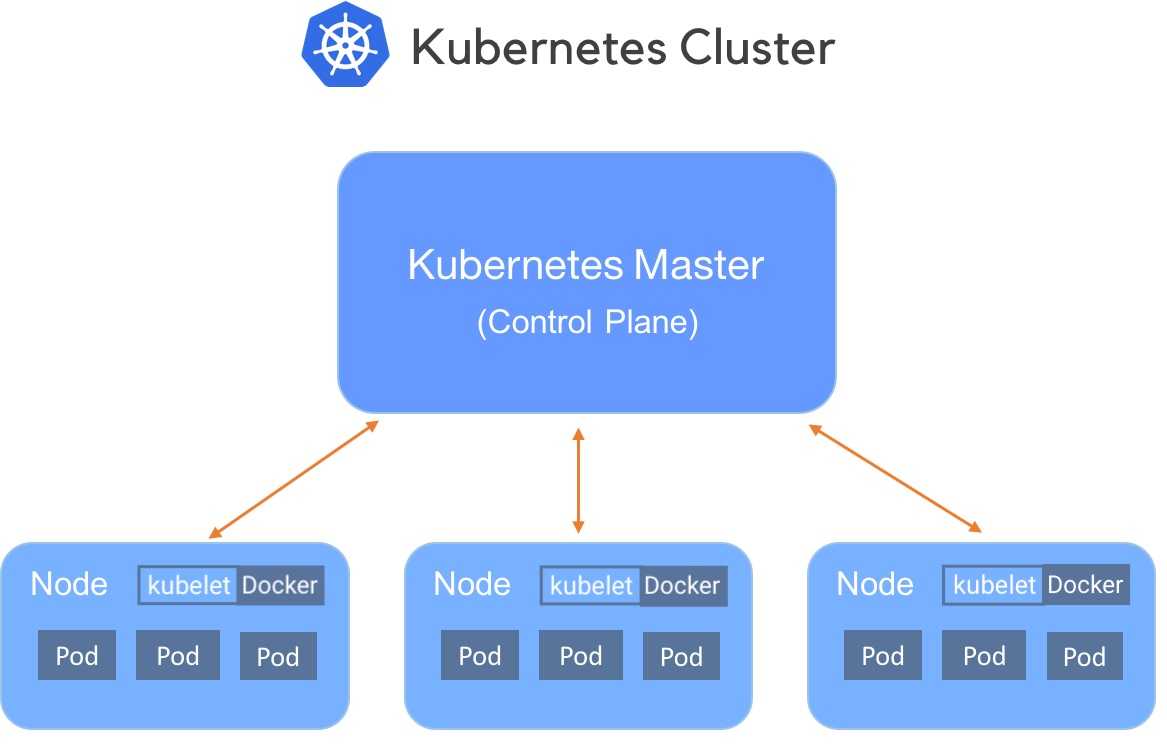
Kubernetes objects
Kubernetes objects - persistent entities in the Kubernetes system. Kubernetes uses these entities to represent the state of the cluster:
- Running containers
- Available resources
- Policies
Objects:
- Pod
- Deployment
- Service
- ...
Read more about Kubernetes objects
Kubernetes Objects: Pods
Pods are (an abstraction of containers):
- the smallest deployable units of computing
- group of one or more containers (tightly coupled)
- could be replicated (scaled horizontally)
- ephemeral, disposable entities (The Pod remains on the node until the Pod finishes execution, the Pod object is deleted, the Pod is evicted for lack of resources, or the node fails.)
Example of .yaml (or .yml) file:
apiVersion: v1
kind: Pod
metadata:
  name: redis
spec:
  containers:
  - name: redis
    image: redis
    volumeMounts:
    - name: redis-storage
      mountPath: /data/redis
  volumes:
  - name: redis-storage
    emptyDir: {}
Kubernetes Objects: Deployment
Provides declarative updates for Pods (an abstraction of Pods).
You describe a desired state in a Deployment, and the Deployment Controller changes the actual state to the desired state.
Example:
apiVersion: apps/v1
kind: Deployment
metadata:
  name: nginx-deployment
spec:
  selector:
    matchLabels:
      app: nginx
  replicas: 2 # tells deployment to run 2 pods matching the template
  template:
    metadata:
      labels:
        app: nginx
    spec:
      containers:
      - name: nginx
        image: nginx:1.14.2
        ports:
- containerPort: 80Kubernetes Objects: Service
An abstract (abstraction of network) way to expose an application running on a set of Pods as a network service.
With Kubernetes you don't need to modify your application to use an unfamiliar service discovery mechanism. Kubernetes gives Pods their own IP addresses and a single DNS name for a set of Pods and can load-balance across them.
Example:
apiVersion: v1
kind: Service
metadata:
  name: my-service
spec:
  selector:
    app: nginx
  ports:
    - protocol: TCP
      port: 80
      targetPort: 9376
Kubernetes object management
| Management technique | Operates on | Recommended environment |
|---|---|---|
| Imperative commands | Live objects | Development projects |
| Imperative object configuration | Individual files | Production projects |
| Declarative object configuration | Directories of files | Production projects |
Examples:
Imperative commands:
kubectl create deployment nginx --image nginxImperative object configuration:
kubectl create -f nginx.yaml
kubectl delete -f nginx.yaml -f redis.yaml
Declarative object configuration:
kubectl apply -f path/to/folder/Organizing resource configurations
project/k8s/development
├── deployment
│   └── my-deployment.yaml
└── service
    └── my-service.yaml
Read more about managing resources
Storage in Pods
Kubernetes volumes:
- similar to Docker volumes
- many types supported
Volume types:
emptyDir- ephemeral (exist as long as Pod is running on that Node)hostPath- mounts a directory from the Node- ... many of other types
Networking
Communications types:
- Highly-coupled container-to-container
Solved by Pods andlocalhost - Pod-to-Pod
Pods on a node can communicate with all pods on all nodes - Pod-to-Service
Covered by Services - External-to-Service
Covered by Ingress
Minikube
- Tool that makes it easy to run Kubernetes locally
- Runs a single-node Kubernetes cluster inside a Virtual Machine (VM)
- Perfect to get started with Kubernetes or develop locally